- How to use this guide
- Budget tiers: what to look for
- What to expect at each price point (details and buying priorities)
- Panel types and where they appear (2026 snapshot)
- Size-class advice: why 55″ is the sweet spot (and when to choose 65″ or 50″)
- What to verify in store (step‑by‑step checklist)
- Final buying strategy
- FAQ
Best 55-Inch TVs to Buy: A Buyer’s Guide for Every Budget
A 55-inch 4K TV is the most popular size for living rooms and apartments — big enough for cinematic immersion, small enough to fit most viewing distances. This guide explains what you can realistically expect at four common price points, the panel technologies behind those expectations, and exactly what to check in store before you buy.
How to use this guide
Start with your budget tier below, then read the panel-type section to match picture priorities (brightness, contrast, viewing angle). Finish with the in-store checklist to avoid surprises like blooming, reflections, or weak motion handling.
Budget tiers: what to look for
Below are practical expectations at four price bands for 55‑inch models. These reflect typical market offerings and the trade-offs you’ll encounter in 2026.
| Price band | Typical panel / backlight | HDR & brightness | Gaming & inputs | Smart features & extras | Common compromises |
|---|---|---|---|---|---|
| ~$400 | Edge‑lit LED (VA or IPS) | Basic HDR formats (HDR10/HLG), modest peak brightness | 60–120Hz panels; occasional HDMI 2.1 features but often limited | Big vendor smart OS, app stores | Lower peak brightness, narrow local dimming, reflections |
| ~$600 | Full‑array basic local dimming or better edge‑lit | Improved HDR tone mapping, higher sustained brightness | 120Hz, VRR appears more often, at least some HDMI 2.1 ports | Better OS performance, streaming apps, eARC on some models | Mid-level local dimming with limited zones |
| ~$900 | Mini‑LED entry or high‑end edge‑lit with strong FALD | Much higher peak brightness, better HDR highlight handling | Multiple HDMI 2.1 ports, low latency, VRR/Freesync/ALLM | More advanced tuners, better upscaling | More costly, but better overall balance |
| $1400+ | OLED / QD‑OLED / top mini‑LED FALD | Best contrast (OLED/QD‑OLED) or very high brightness (mini‑LED) for HDR | Full HDMI 2.1 suite, 120Hz native, advanced game modes | Premium image processing, pro calibration options | Cost; OLED burn‑in consideration for static UI elements |
What to expect at each price point (details and buying priorities)
Around $400
- What to prioritize: a good processor (for upscaling), low-reflection screen finish, and a reputable smart OS that won’t feel sluggish.
- Reality check: Most models are edge‑lit; deep blacks are limited and HDR highlights look muted. Gaming is possible but often limited to 60Hz or 120Hz with software tricks rather than true hardware support.
- Buy-if use case: casual streaming, TV shows, and budget-conscious buyers who value apps and ease of use over absolute picture quality.
Around $600
- What to prioritize: local dimming (even a simple full-array with few zones), at least one HDMI 2.1 port for modern consoles, and higher native refresh (120Hz panels increasingly common).
- Reality check: You’ll see a noticeable jump in contrast and motion from the $400 tier, but expect some haloing around bright objects in dark scenes.
- Buy-if use case: mixed use—streaming, sports, mid-level gaming.
Around $900
- What to prioritize: true mini‑LED backlight or a high‑end edge‑lit model with many local dimming zones, consistent HDR tone mapping, and solid upscaling for 1080p content.
- Reality check: This is the sweet spot for buyers who want near‑flagship performance without flagship pricing. You’ll get better HDR impact and gaming connectivity.
- Buy-if use case: viewers who want cinematic HDR, frequent gamers running current consoles/PCs, and anyone who watches a lot of HDR streaming.
$1400 and up
- What to prioritize: pick a panel type that matches your room lighting and viewing habits: OLED/QD‑OLED for perfect blacks and wide viewing angles, top-tier mini‑LED for very bright rooms and HDR highlights.
- Reality check: At this price you get pro‑level processing, multiple full HDMI 2.1 inputs, and advanced calibration. OLEDs deliver best blacks; mini‑LEDs beat OLEDs for peak HDR brightness.
- Buy-if use case: serious home theater, shared living rooms with wide seating angles, or gamers demanding the best HDMI feature set.
Panel types and where they appear (2026 snapshot)
OLED (including WOLED)
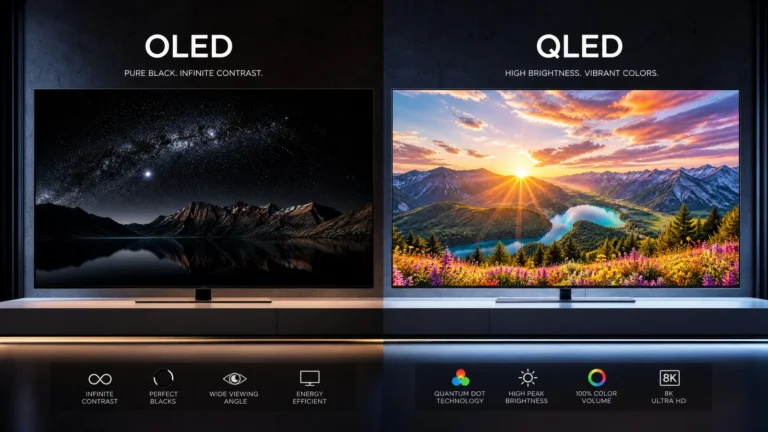
- Strengths: per‑pixel black, excellent contrast, wide viewing angles, natural motion.
- Weaknesses: limited peak brightness versus mini‑LED, long‑term risk of image retention/burn‑in if improperly used.
- Typical price band: $900+ for premium 55‑inch sets; entry-level OLED variants occasionally dip near the high‑$700s depending on sales.
QD‑OLED
- Strengths: combines OLED black levels with wider color volume and higher effective brightness than traditional OLED in many scenes.
- Weaknesses: still premium priced and availability varies by manufacturer.
- Typical price band: $1400+ for current-generation models, though prices can vary.
Mini‑LED with FALD (Full Array Local Dimming)
- Strengths: very high peak brightness, strong HDR highlights, reduced blooming with many zones.
- Weaknesses: zone granularity matters—cheaper mini‑LEDs with fewer zones still show halos; viewing angles less forgiving than OLED.
- Typical price band: mid-high ($900+) to premium ($1400+) depending on processing and zone count.
VA and IPS LCD (standard LED)
- VA panels: better native contrast and black levels than IPS, but narrower viewing angles.
- IPS panels: wider viewing angles, faster response time in some cases, but lower contrast and black depth.
- Typical price band: majority of $400–$600 models; still used in budget and some mid-range TVs for cost reasons.
Size-class advice: why 55″ is the sweet spot (and when to choose 65″ or 50″)
- Viewing distance: For 4K, a comfortable viewing distance for 55″ is roughly 7–10 feet (2.1–3 m). Closer than that and you may benefit from 65″ if your room allows.
- Room size and seating: If your seating is wider (multiple seats spread across the room), consider 65″ for better immersion and readability for viewers off-center.
- Content type: If you watch a lot of sports or group content, the larger size improves visibility. For single‑viewer, cinematic use in a smaller room, 55″ often provides better pixel density.
- Practical tip: measure sightlines and check TV wall proportions — a 65″ can dominate small rooms and create a poor viewing geometry.
What to verify in store (step‑by‑step checklist)
Take these checks with you and, when possible, bring a phone with sample HDR videos or use store demo loops.
1. Reflection and finish
- Observe the screen with store overhead lights and at multiple angles. Matte finishes reduce glare; glossy finishes can pop in darker rooms.
- Play a dark scene with small bright objects (e.g., night city with lights) to spot haloing from local dimming.
- Look for patchy clouding or bright edges on a near‑black full‑screen image. Uniformity matters for night scenes.
2. Black level and blooming
3. Uniformity
4. Motion handling
- Watch fast pans or sports footage. Look for judder, smear, or soap opera artifacts. Check motion smoothing settings and whether motion interpolation can be turned off.
5. Native refresh and gaming features
- Confirm native panel refresh (60Hz vs 120Hz) and whether VRR, ALLM, and low-latency game modes are present on all HDMI inputs you plan to use.
6. HDR behavior
- Use real HDR content if available. Check tone mapping — does the TV crush shadows or wash out highlights?
7. Smart OS responsiveness
- Navigate the menus and launch apps. Laggy interfaces are common on budget models.
8. Ports and remote
- Verify HDMI inputs (number and labeling), eARC support, and whether the remote meets your preference (voice, backlight, dedicated app buttons).
9. Calibration and settings
- Check picture presets; see if there is a “Filmmaker” or “Calibrated” mode that respects source color and motion. Confirm basic calibration controls (white balance, gamma, RGB balance).
10. Warranty and return policy
- Ask about panel replacement policies, extended warranties, and return windows in case you experience a panel lottery issue.
Final buying strategy
- Set a realistic budget and prioritize features you actually use: if you game a lot, HDMI 2.1 and low input lag matter; if you sit off‑axis with family, OLED or IPS-based tech matters for viewing angles; if your room is bright, prefer mini‑LED for HDR pop.
- Don’t buy based on brochure peak brightness numbers alone — look for sustained brightness and good tone mapping in real content.
- Wait for seasonal promotions if you can; TVs are annually refreshed, and last year’s high-end models often drop into lower tiers after new launches.
FAQ
Are 55-inch TVs still the best value in 2026?
Yes. 55-inch 4K TVs balance size, picture detail, and price for most living rooms. They work well at typical viewing distances and are the most common size with wide feature availability.
Should I worry about burn‑in on OLED?
Burn‑in risk exists but is manageable. Use varied content, enable pixel-shift and screen-saver features, avoid static UI elements at max brightness, and keep firmware updated. For most viewers, burn‑in is a low-probability concern with sensible use.
Do I need HDMI 2.1 for a 55-inch TV?
If you plan to use a current-generation console or high-frame-rate PC gaming at 4K/120Hz, HDMI 2.1 (or similar feature parity: VRR, ALLM, sufficient bandwidth) is recommended. For streaming and regular TV, HDMI 2.0 is usually sufficient.
How important is local dimming versus OLED?
Local dimming (especially mini‑LED with many zones) improves HDR highlights and contrast on LCDs, but it cannot match OLED’s pixel-perfect blacks. Choose mini‑LED if you need very high brightness; choose OLED for perfect black and wide viewing angles.
This article was written and reviewed by the SmartTechTVs editorial team. Read our About