- How QLED and OLED actually work
- Brightness and HDR performance
- Contrast and black levels
- Color volume and saturation
- Motion handling and gaming
- Burn‑in risk and longevity
- Price, screen sizes, and availability
- Which rooms suit each technology
- One practical buying checklist (step‑by‑step)
- Practical tips to reduce OLED burn‑in risk
- Quick comparison table
- Final practical recommendation
- FAQ
QLED vs OLED: The Honest Comparison for Every Buyer
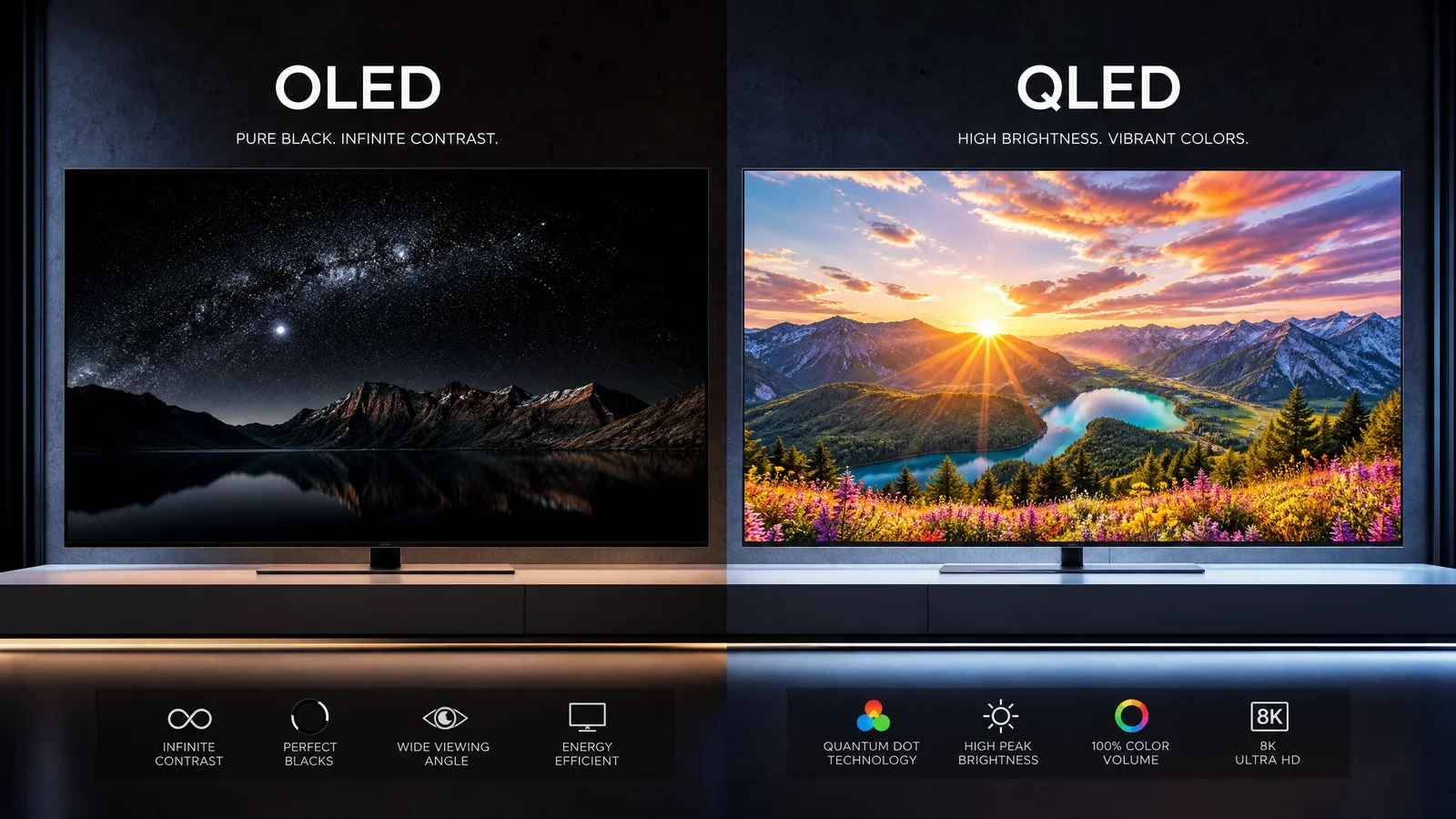
Short answer first: QLED is an LCD-TV family that uses quantum dots to boost brightness and color, while OLED is a true self‑lit panel where each pixel emits its own light. Below is a practical, no-nonsense comparison that will help you pick the right TV for your room and viewing habits.
How QLED and OLED actually work
QLED = LCD with quantum dots
- QLED panels are fundamentally LCDs. A backlight (today often mini‑LED in higher-end models) shines through an LCD layer. Quantum dots sit between the backlight and the LCD to convert and fine‑tune light, improving color saturation and efficiency.
- Manufacturers sometimes bundle the term with advanced backlight systems (mini‑LED) and heavy processing. That’s still an LCD at its core: separate light source + liquid crystal layer.
OLED = self-lit pixels
- OLED pixels produce light individually. There’s no global backlight — each pixel is an independent emitter.
- This architecture is why OLEDs can display “perfect black” by turning pixels fully off and why they have excellent viewing angles and contrast.
Brightness and HDR performance
- QLED (especially with mini‑LED backlights) generally delivers higher peak brightness. That makes a visible difference with HDR highlights in very bright rooms and with specular highlights (sun glare, metallic reflections).
- OLED has lower peak brightness compared with high‑end QLEDs but handles perceived contrast and tone mapping differently because of its pixel-level control.
- Practical takeaway: If you sit in a very bright, sunlit living room or want the punchiest HDR highlights, QLED is the safer bet. If you watch mostly in dim/controlled lighting, OLED’s overall HDR experience is often more satisfying despite lower peak nit numbers.
Contrast and black levels
- OLED wins raw contrast hands down because it can switch pixels fully off to produce true black — no blooming, no halo from adjacent bright zones.
- QLED, even with thousands of mini‑LED dimming zones, still has some degree of blooming or halo around bright objects on dark backgrounds. Manufacturers have made great progress, but the tradeoff is still there.
- If you prioritize deep cinematic blacks and shadow detail for movies, OLED is the superior choice.
Color volume and saturation
- Quantum dots materially improve color volume on LCDs, so high‑end QLEDs deliver very strong saturated colors, especially at high brightness.
- OLED also produces excellent, wide‑gamut color, and because it controls pixel output precisely, it offers accurate color at lower brightnesses.
- In real-world viewing, both technologies can look superb. QLED may pull ahead for punchy, bright color in sunny environments; OLED often looks richer in darker scenes.
Motion handling and gaming
- OLED panels have very fast pixel response times, which reduces motion blur for fast camera pans and gaming. Native motion clarity is typically excellent.
- QLED motion performance varies by panel and backlight approach. High‑refresh QLEDs with strong processing and backlight scanning can be as good or, in some cases, better for certain gaming scenarios.
- By 2026, most mid‑ and high‑end models from both camps support HDMI 2.1 technical standards features: 4K@120Hz, VRR, and ALLM. Check specific model support if you plan to game competitively.
- Practical gaming note: If you want instantaneous pixel response and the smoothest possible black transitions, OLED is often the default choice; if you want maximum sustained brightness for HDR gaming, a high‑end QLED can be appealing.
Burn‑in risk and longevity
- OLED panels can experience permanent image retention (“burn‑in”) if static elements are displayed at high brightness for long periods. However, modern OLEDs include aggressive mitigation: pixel shift, automatic dimming of static UI elements, panel refresh cycles, and usage limits.
- For most viewers who vary content (movies, TV, games) and avoid leaving static logos or HUDs on full brightness for hours daily, the practical risk is low.
- QLED (LCD) has negligible burn‑in risk; image retention can happen but is usually temporary and uncommon.
- If you run content with static HUDs or a TV wall with 24/7 signage, QLED or other LCD-based solutions remain the safer long-term choice.
Price, screen sizes, and availability
- OLED historically carried a price premium, but production scale and competition have lowered prices; still, large OLEDs tend to be pricier than comparable LCDs due to manufacturing complexity.
- QLED/LCD spans a wider price range and is available in extremely large sizes and more niche form factors. Mini‑LED backlights push QLED prices upward into premium territory, narrowing the price gap with OLED.
- If you want the largest possible screen at the lowest cost per inch, LCD/QLED is often the way to go; for larger flagship OLEDs, choices exist but are fewer and sometimes costlier.
Which rooms suit each technology
- Bright living rooms with large windows: QLED — higher peak brightness and strong anti‑reflection options help combat ambient light.
- Controlled or dark home theaters: OLED — unrivaled blacks and contrast produce the most immersive movie experience.
- Mixed-use family rooms: QLED can be more versatile, especially if the room gets variable lighting or you have bright daytime viewing.
- Gaming setups: Both work well. Choose based on panel features: OLED for superior motion and contrast; QLED for brighter HDR and static‑image-heavy UIs.
One practical buying checklist (step‑by‑step)
1. Define your main use: movies, sports, mixed TV, gaming, or signage.
2. Measure your room brightness and viewing distance to choose an appropriate screen size and consider peak brightness needs.
3. If you mostly watch in the dark and want cinematic blacks → prioritize OLED.
4. If your room is bright or you want the brightest HDR → prioritize QLED/mini‑LED.
5. For gaming, confirm HDMI 2.1 ports, 120Hz support, and low input lag on the specific model.
6. Check warranty and panel protections: some brands offer extra protection plans for OLED burn‑in.
7. Inspect local store demos if possible (pay attention to reflections and shadow detail rather than showroom brightness settings).
8. Budget: compare final prices for the sizes you want; sometimes last-generation flagship models represent good value.
Practical tips to reduce OLED burn‑in risk
- Use dynamic content rotation: avoid leaving static images or channels with constant logos on for many hours.
- Keep overall brightness reasonable for long sessions; use automatic brightness limiters when watching HDR at peak brightness.
- Enable pixel shift and screen savers; run mild panel maintenance cycles if the TV supports them.
- For gaming, hide HUDs when not needed and use full‑screen modes when possible.
Quick comparison table
| Feature | QLED (LCD + Quantum Dots) | OLED (Self‑lit Pixels) |
|---|---|---|
| Light source | Backlight (often mini‑LED for premium models) | Each pixel emits its own light |
| Peak brightness | Generally higher (advantage in bright rooms/HDR highlights) | Lower peak brightness but excellent perceived contrast |
| Black level | Very good with mini‑LED, but can show blooming | True blacks (pixels off), industry-leading contrast |
| Color volume | Very strong at high brightness (quantum dots) | Excellent color accuracy, especially in dark scenes |
| Motion | Good with appropriate processing; depends on model | Fast pixel response, excellent native motion clarity |
| Burn‑in risk | Negligible | Possible with static content, mitigations in place |
| Typical price range | Wide range; more options at very large sizes | Premium at similar sizes, but prices have dropped |
| Best rooms | Bright/light rooms, multipurpose living areas | Dark home theaters, movie-first setups |
Final practical recommendation
If you prioritize cinematic image quality, deep blacks, and wide viewing angles for movie nights in a dark room, lean OLED. If you need a versatile TV that performs in bright conditions, offers very high peak brightness, or you run static images for long periods, a QLED (especially with mini‑LED) will serve better. For many buyers, comparing TVs side by side at the size you plan to buy — and assessing brightness, reflection handling, and picture modes — will clarify which technology fits your everyday use.
FAQ
Is burn‑in still a real concern for OLED in 2026?
Yes, burn‑in remains a potential issue for heavy, static use, but modern OLEDs include strong mitigation and the practical risk for typical varied viewing is low.
Which is better for watching sports and daytime TV?
QLED is generally better for bright rooms and daytime viewing because of higher peak brightness and improved anti‑reflection options.
Do gamers need to avoid OLED?
No — many gamers prefer OLED for its fast pixel response and contrast. If you play content with permanent HUDs for long hours, consider brightness management and OLED protections, or choose QLED for peace of mind.
Should I wait for microLED or other new tech?
MicroLED promises the best of both worlds but is still largely premium and limited in availability. If you need a TV now, OLED or high‑end QLED represents mature, widely available choices with well‑understood tradeoffs.
This article was written and reviewed by the SmartTechTVs editorial team. Read our Editorial Policy and About page.
This article was written and reviewed by the SmartTechTVs editorial team. Read our Editorial Policy and About page.
Related Reading: Vizio SmartCast: Features, Pros, and Cons