4K vs 8K TV: Is 8K Worth It Yet?
SmartTechTVs.com — tv-technology
A quick answer: 8K adds four times the pixels of 4K, but whether you’ll see the difference depends on screen size, viewing distance, content, and budget. This guide breaks down the technical realities and practical decisions so you can choose a TV that actually improves your viewing experience.
Resolution difference
Pixel math and perceived detail
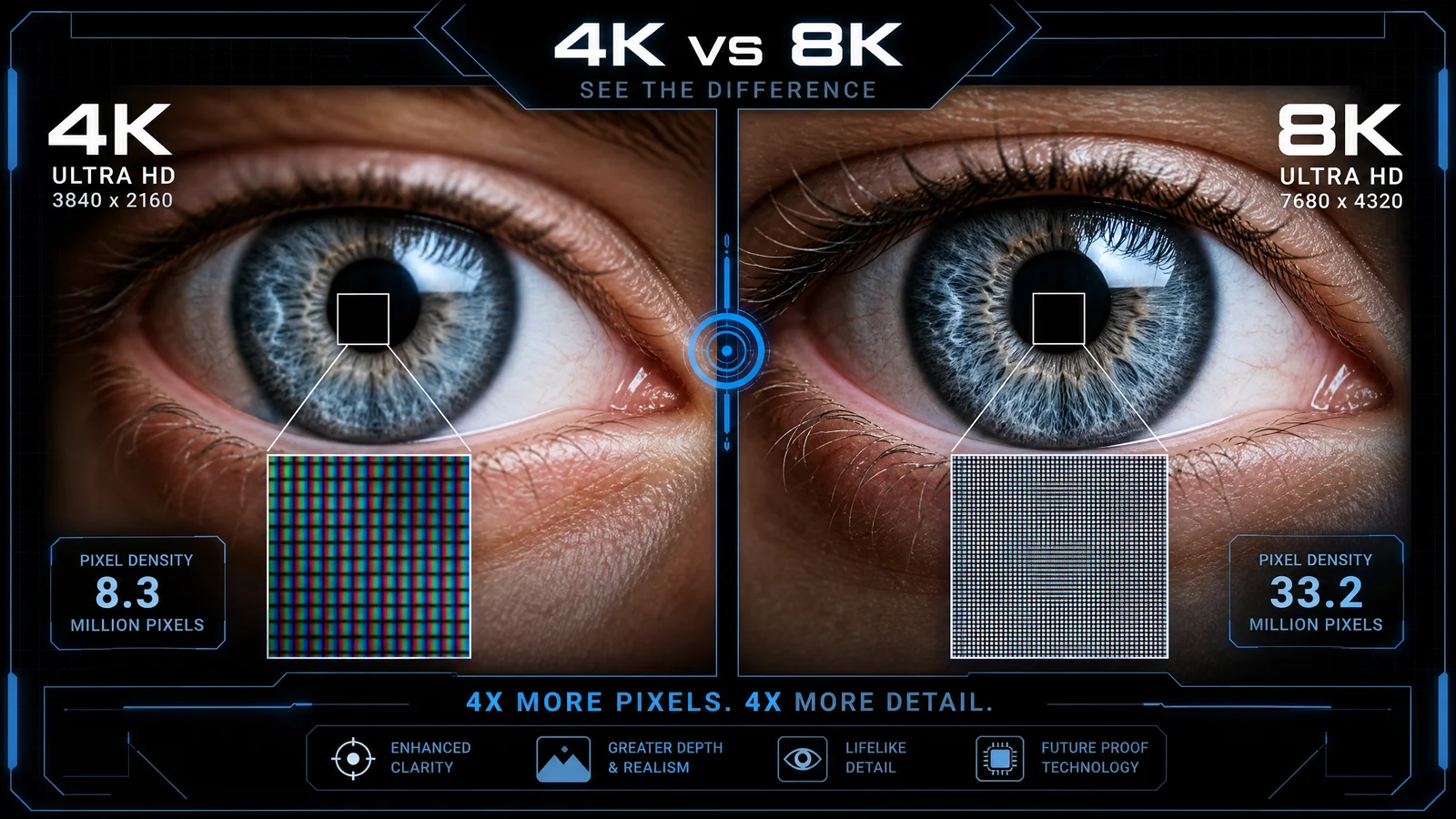
4K (3840×2160) provides about 8.3 million pixels; 8K (7680×4320) roughly 33.2 million. On paper, that’s a big leap. In practice, perceived sharpness depends on angular resolution — how many pixels fall into one degree of your field of view — and on contrast and motion.
Key points:
- Doubling horizontal and vertical resolution gives four times the pixels, not twice the perceptible clarity at every distance.
- The human eye’s resolving power is limited: for most adults the theoretical limit is roughly 1 arcminute (1/60th of a degree), but real-world factors (age, lighting, content contrast) typically reduce that.
- On small screens or from typical couch distances, extra 8K pixels can be effectively invisible.
Content availability
Where real 8K content exists in 2026
Content is the gating factor for native 8K value.
- Streaming: YouTube continues to be the main platform with consumer 8K uploads; a few experimental or niche offerings exist on some services but mainstream catalogs (Netflix, Prime Video, Disney+) remain overwhelmingly 4K or less.
- Broadcast and live sports: Very limited. Broadcasters have run 8K tests and occasional event coverage, but global distribution remains scarce.
- Physical media: Ultra HD Blu-ray has standardized 4K; commercial 8K discs are not widespread.
- Gaming: Current mainstream consoles and PC GPUs primarily target 4K gaming. Some PC setups can render 8K, but they’re niche and require very high-end GPUs.
- Cameras and phones: Many cameras and smartphones can capture 8K video, but capture is not the same as distribution — creators often downscale for editing or streaming.
Bottom line: native 8K viewing options are still limited for most people in 2026. Upscaled 4K remains the dominant viewing experience.
Upscaling quality
How modern upscalers work
Modern upscalers use multi-stage processing: edge-aware algorithms, temporal reconstruction, motion compensation, and increasingly, machine learning models trained on large datasets of high- and low-resolution pairs. TV manufacturers market “AI upscalers” to describe these pipelines.
What matters:
- TV processing silicon (chipsets) and software influence upscaling more than native resolution. A high-quality 4K panel with a strong upscaler can look better than an 8K panel with poor processing.
- Temporal processing is crucial: good upscalers use frame history to reconstruct detail without introducing shimmer or artifacts.
- Expect vendors to continue improving models via firmware updates.
Practical tips
- Watch native 4K content on different TVs before buying — the upscaler often determines perceived detail.
- For sports and live TV with fast motion, look for TVs with proven motion processing and low-latency upscaling.
Price
Cost realities and value
8K TVs remain a premium category. By 2026 the price gap has narrowed compared to earlier years, but 8K models still generally cost more than comparable-size 4K models due to higher panel complexity and premium positioning.
Consider total cost:
- TV price is only part of the equation; factor in calibration, cables (see HDMI section), and any future content/accessory upgrades.
- If resale value matters, early-adopter 8K sets may depreciate faster until native content and ecosystem mature.
When price matters most:
- If you want the best picture-per-dollar today, a high-end 4K TV (OLED or mini-LED) typically offers stronger value than an 8K set.
- If you prioritize future-proofing and budget is flexible, 8K can make sense—but not strictly for immediate image improvements.
HDMI 2.1 bandwidth and real-world implications
Bandwidth basics and practical caveats
HDMI 2.1 introduced higher bandwidth (up to 48 Gbps) which enables uncompressed 8K@60Hz and 4K@120Hz in theory. Two practical realities matter:
1. DSC (Display Stream Compression) is widely used. Many 8K implementations rely on visually lossless DSC to reduce required bandwidth for 8K modes, especially with HDR and higher chroma. DSC has matured and is commonly accepted across devices.
2. “HDMI 2.1” labeling varies. Manufacturers sometimes enable subsets of HDMI 2.1 features on specific ports (e.g., 4K@120 and VRR on one port). Check the spec sheet for which ports support which modes.
Practical checklist:
- Look for TVs that clearly list 8K/60 and 4K/120 support per HDMI port and indicate whether DSC or reduced chroma is used.
- Use certified high-speed HDMI cables rated for 48 Gbps to avoid handshake issues.
- If you plan to game at 4K/120, ensure the TV supports VRR, ALLM, and low input latency on the relevant port.
Viewing distance science
How close do you need to sit?
To benefit from 8K, you must sit significantly closer than for 4K. A simplified way to compare is to consider when the eye can resolve individual pixels.
Practical rules:
- For a 65-inch TV, the extra detail of 8K becomes perceptible at closer viewing distances (often under 4–5 feet for many viewers). Most living rooms are farther than that.
- On very large screens (75″+) or in close seating arrangements (dedicated home theaters), 8K advantage is more likely to be visible.
- Age and eyesight matter: younger viewers with excellent visual acuity will see gains at slightly greater distances; many people will not.
If you want a rough calculation:
- Angular resolution target ~1 arcminute. Use screen height and viewing distance formulas or online calculators to estimate the distance at which the pixel pitch becomes resolvable for your eyes.
Recommendation
Who should buy 8K now
- You sit very close to a very large screen (75″ and up) and want the most detailed possible image now.
- You prioritize future-proofing and are comfortable paying a premium for the latest display tech.
- You create or regularly view native 8K content (professional creators, some photographers/videographers).
Who should wait or choose 4K
- Most living rooms: a high-quality 4K OLED or mini-LED will deliver better picture quality per dollar, with superior HDR, processing, and more content.
- Gamers using consoles: current mainstream consoles still target 4K; unless you have a high-end PC that can deliver 8K, stick with 4K for best performance and features.
- Budget-conscious buyers: money goes farther on 4K for size and picture quality.
Practical buying checklist:
- Prioritize panel quality, upscaling performance, HDR handling, and motion processing over resolution alone.
- Verify HDMI port capabilities and cable compatibility if you plan 8K content or 4K/120 gaming.
- Compare side-by-side in real content scenarios: sports, movies, streaming shows — not just synthetic test patterns.
| Comparison | 4K (3840×2160) | 8K (7680×4320) |
|---|---|---|
| Native pixel count | ~8.3 million | ~33.2 million |
| Typical practical benefit in living rooms | Strong — widely visible on 55–75″ at normal distances | Marginal unless very large screen or very close seating |
| Content availability (2026) | Extensive (4K streaming, Blu-ray, games) | Limited (YouTube, niche streams, creator uploads) |
| Upscaling importance | Important but mature; many TVs excel | Critical — 8K often viewed with upscaled 4K/HD content |
| Price relative to comparable 4K models | Mid-to-high | Premium |
| HDMI/Interface needs | 4K/120 needs HDMI 2.1 features | 8K prefers HDMI 2.1 with DSC or full 48 Gbps |
| Best use case | Most buyers — balance of price, content, picture | Enthusiasts with large screens, prosumers, future-proofing |
Final take
8K is technologically impressive and will increasingly matter in professional and very large-format home setups. For most buyers in 2026, a high-end 4K TV — especially an OLED or top-tier mini-LED with strong upscaling — remains the smarter purchase. Buy 8K if your room, viewing habits, and budget align; otherwise, invest in panel quality and processing, not just pixel count.
FAQ
Is native 8K content common on streaming services?
No. Most major streaming catalogs remain 4K or lower; native 8K content is still rare and mostly limited to experimental releases or niche uploads.
Will 8K TVs get cheaper soon?
Prices have been trending downward, but 8K remains a premium tier. Expect gradual price reductions as panel manufacturing scales, but significant discounts typically trail 4K adoption.
Do I need special cables for 8K?
Use certified high-bandwidth HDMI cables (48 Gbps-rated) and confirm the TV’s HDMI port capabilities. Many setups rely on DSC to handle 8K modes, so check manufacturer documentation.
Will gaming benefit from 8K right now?
Not generally. Most consoles and the majority of games target 4K. Only high-end PC rigs can realistically produce playable native 8K, and that’s niche.
This article was written and reviewed by the SmartTechTVs editorial team. Read our About and QLED vs OLED: Which Display Technology Is Better?