OLED or Mini-LED: Which Should You Actually Buy?
Choosing between OLED and Mini-LED in 2026 is about matching a panel’s strengths to how and where you watch. This guide gives a practical decision framework—by room, content type, budget and daily hours—clearly explains burn-in risk, and offers hybrid buying strategies so you end up with a TV that fits your home, not just the spec sheet.
How to decide: a 4-step framework
Follow these four steps before you click “buy.” Be honest about your room, what you watch, how much you’ll use the TV, and how much you’re ready to spend.
1) Start with the room
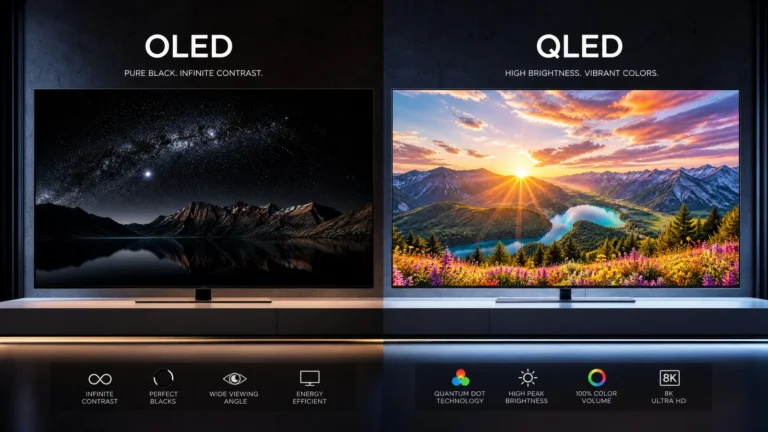
- Dark / controlled lighting: OLED excels because its per-pixel self-emissive blacks create the best contrast and shadow detail. Perfect for cinema-style rooms and late-night viewing.
- Bright / sunlit rooms: Mini-LED (LED-backlit LCD with dense local dimming and Mini-LED backlight) usually outperforms standard OLED because it can sustain higher peak brightness and fight reflections better.
- Multi-purpose living room: If the TV faces windows and is used for news/sports during daylight and movies at night, Mini-LED is often the more versatile choice.
- Placement and viewing angle: IPS-based Mini-LEDs have wider viewing angles but worse contrast than VA-based Mini-LEDs. OLED panels retain wide viewing angles with no contrast loss.
2) Match to the content you primarily watch
- Movies and high-quality streaming dramas: OLED (or QD‑OLED) gives superior black levels, organic contrast and HDR shadow detail.
- Sports, live TV, and daytime news: Mini-LED handles bright highlights and reflective rooms better; its peak brightness keeps HDR highlights punchy in daylight.
- Gaming: Both technologies now support low latency, VRR and 4K120. If you game in a dark room and prioritize contrast and deep blacks, OLED is excellent. If you game in a bright room and frequently play HDR titles that rely on high peak brightness, Mini-LED may be preferable.
- Mixed use (movies + bright-room daytime use): Consider a hybrid household approach (see Hybrid Recommendations).
3) Factor in budget
- Entry-level / tight budget: LED-LCDs with standard backlighting remain the cheapest. Among higher-end options, Mini-LED models give many high-end features (high brightness, extensive local dimming) without OLED’s premium.
- Mid-range: You’ll find both OLED and Mini-LED options. Compare local-dimming performance, HDR tone-mapping, and control features rather than relying on brand names.
- Premium: OLED (including advances like WOLED and QD-OLED) is the cinematic choice for home theaters. High-end Mini-LEDs compete strongly for bright-room installs and large sizes.
4) Consider daily usage hours and content mix
- Heavy daytime usage (8+ hours daily) in bright rooms: Mini-LED is more forgiving for long, bright sessions.
- Long, varied use with lots of static UI elements (news tickers, channel logos): Prefer Mini-LED for lower theoretical susceptibility to image retention issues.
- Moderate-to-light usage (2–5 hours daily), mixed content: OLED’s image quality is likely the best value if you watch mostly movies and TV shows at night.
Quick, practical buying checklist
1. Measure viewing distance and wall/window placement.
2. Decide primary content type (movies, sports, gaming).
3. Shop for required features (HDMI 2.1 ports, VRR, ALLM, eARC).
4. Inspect local dimming performance in-store where possible (look for haloing around bright objects).
5. Ask about manufacturer burn-in policies and panel warranty details.
6. Calibrate or use professional presets out of the box for the best picture.
One-table comparison
| Feature / Use-case | OLED (WOLED / QD-OLED) | Mini-LED (high-end LCD) |
|---|---|---|
| Contrast & black level | Excellent — true per-pixel black | Very good — depends on local dimming performance |
| Peak HDR brightness | Good to very good (improved with QD-OLED) | Excellent — higher sustained peaks in bright scenes |
| Bright-room performance | Challenged by reflections and long-term brightness limits | Strong — better for daylight viewing |
| Bloom / halo artifacts | None (self-emissive) | Possible around bright objects if dimming zones are coarse |
| Motion / response | Excellent motion clarity and low response times | Very good; VA panels may have faster contrast, IPS trades contrast for angle |
| Burn-in / image retention | Possible with extreme static use, mitigated by software | Very low — image retention uncommon |
| Power consumption | Typically lower for darker content, higher for bright images | Can be higher due to backlight operation |
| Best for | Home theaters, movie lovers, dark-room gaming | Bright rooms, sports, daytime-heavy households |
Burn-in: myths vs. reality
Burn-in remains the most misunderstood point when choosing OLED.
- Myth: OLEDs always burn in after a year. Reality: Modern OLED panels and TVs include multiple hardware and software mitigation measures—pixel shifting, luminance limiting, panel refreshing cycles and scan-based refresh routines—that make burn-in rare for normal viewing habits.
- Myth: Mini-LED never has image retention. Reality: LCDs can show temporary image retention under extreme test patterns, but it is usually transient and reversible; permanent burn-in is effectively nonexistent for modern LCD-based Mini-LEDs.
- Practical risk assessment:
- Typical mixed-use household: Risk of permanent burn-in on OLED is low if you avoid leaving static channel logos, HUDs, or news tickers on for many hours every day for months.
- Heavy static UI use (commercial signage, flight simulators, casinos): Avoid OLED.
- Mitigation checklist for OLED buyers:
- Use automatic brightness limiters (ABL) and reduce maximum brightness in settings if you watch long sessions of UI-heavy content.
- Enable pixel shifting and screen savers; modern TVs do this by default but check menus.
- Rotate content types and avoid prolonged static imagery.
- Run manufacturer panel maintenance (pixel refresh) as recommended—some TVs schedule this automatically during standby hours.
- Consider extended warranties or burn-in protection plans if you expect heavy static usage.
Hybrid recommendations: combining strengths without regrets
Many households benefit from a hybrid approach: an OLED in a dedicated dark media room and a Mini-LED in the family living room. Here’s how to plan it sensibly.
Option A — One TV fits most homes
- Choose Mini-LED if:
- Your living area gets a lot of daylight.
- You watch a mix of sports, daytime TV, and gaming.
- You want high sustained HDR brightness.
- Choose OLED if:
- You mainly watch movies at night or use a dedicated dark room.
- You prioritize the deepest blacks and contrast for cinematic viewing.
Option B — Two-TV setup (recommended for mixed priorities)
- Living room / family space: Mini-LED sized for daylight viewing, good brightness for HDR sports and family TV.
- Home theater / media room: OLED for movies, late-night gaming, and critical viewing.
- Shared benefits: You’ll use each panel for its strengths and lower the long-term wear on either panel.
Practical installation tips
- Control ambient light with curtains and bias lighting to improve perceived contrast; bias lighting especially helps OLEDs reduce eye strain without affecting black levels.
- Set picture modes: use movie/cinema modes for OLED (turn off aggressive dynamic contrast), and calibrated/filmmaker modes for Mini-LED where available.
- For gamers: ensure low input lag and VRR support on the chosen TV and enable game mode; confirm HDMI 2.1 bandwidth for 4K at 120Hz if needed.
When to prioritize features over panel type
- If you need multiple HDMI 2.1 ports for consoles and PCs, compare models across both panel types—some Mini-LED sets have better port availability.
- If you want the largest screen sizes at the lowest cost per inch, high-end Mini-LED and standard LCDs often offer larger sizes more affordably than OLED.
- If you value color volume at high brightness, look at QD-OLED and QD-enhanced Mini-LEDs; assess real-world HDR tone mapping rather than claimed nit figures.
Final buying steps (1–2 hours of focused work)
1. Measure and photograph the intended TV wall at the times you usually watch (day and evening).
2. Narrow choices by size, features (HDMI ports, VRR), and panel type (OLED or Mini-LED).
3. In-store: watch HDR demos, check for reflection handling, and observe local dimming halos on Mini-LED demos.
4. Read recent firmware update notes and check warranty/burn-in policies.
5. Buy from a retailer with a good return window and consider professional calibration if you demand the most accurate image.
FAQ
Is burn-in a problem I should worry about with modern OLEDs?
For typical home use—movies, TV, gaming—modern OLEDs rarely suffer permanent burn-in thanks to pixel shift, refresh routines and conservative brightness behavior. Avoid prolonged static image display and follow recommended settings.
Can Mini-LED match OLED blacks?
High-end Mini-LEDs approach OLED black levels by using thousands of dimming zones, but some haloing around small bright objects can still occur. For absolute per-pixel black, OLED remains superior.
Which panel is better for daytime bright rooms?
Mini-LED typically wins in bright rooms because it sustains higher peak brightness and reduces the visible impact of window reflections.
Should I buy two TVs (one OLED, one Mini-LED)?
If your home includes both a dedicated dark home-theater space and a bright family room, yes—pairing an OLED for night-time cinematic viewing with a Mini-LED for daytime use gives the best overall experience without compromise.
This article was written and reviewed by the SmartTechTVs editorial team. Read our About and OLED vs Mini-LED: Which Display Technology Should You Buy in 2026?.